![PP LOGO.svg]](https://help.piranhaprofits.com/hubfs/PP%20LOGO.svg)
Step 1: Enable Direct Messages in Discord
You must allow Direct Messages so the bot can reply to you privately.
On Desktop (Discord app or browser)
- Open Discord and go to our Piranha Profits server.
- Click the Piranha Profits server name (top left) to open the menu.
- Click Privacy Settings.
- Turn ON: Direct Messages.
On Mobile (Discord app)
- Open Discord and go to our Piranha Profits server.
- Tap the Piranha Profits server name at the top.
- Tap Privacy Settings (or Settings).
- Turn ON: Direct Messages.
Step 2: Message the bot and check your membership
- Go to Direct Messages
- Open a chat with our Piranha Profit Bot (Piranha Profits Bot#8889).
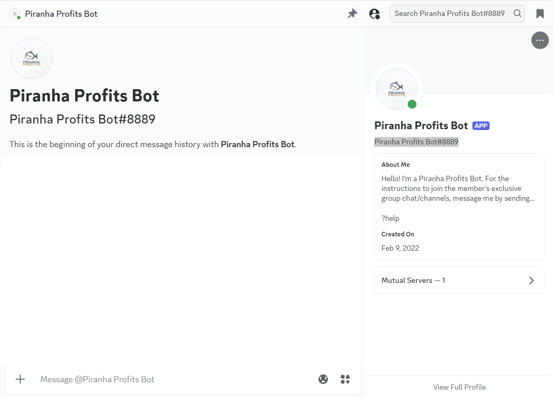
3. Type this command:
?membership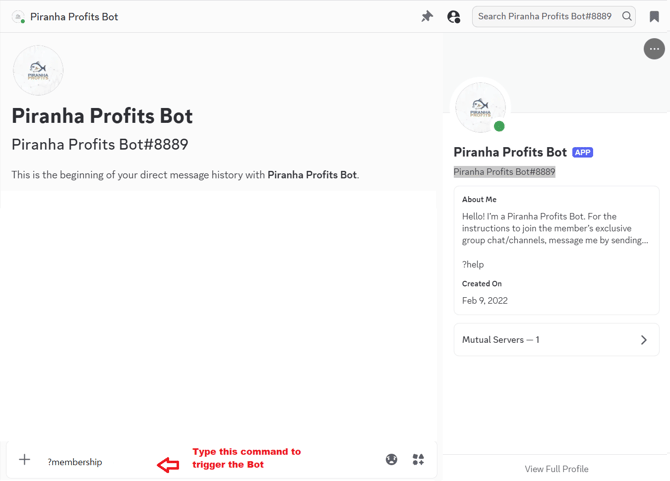
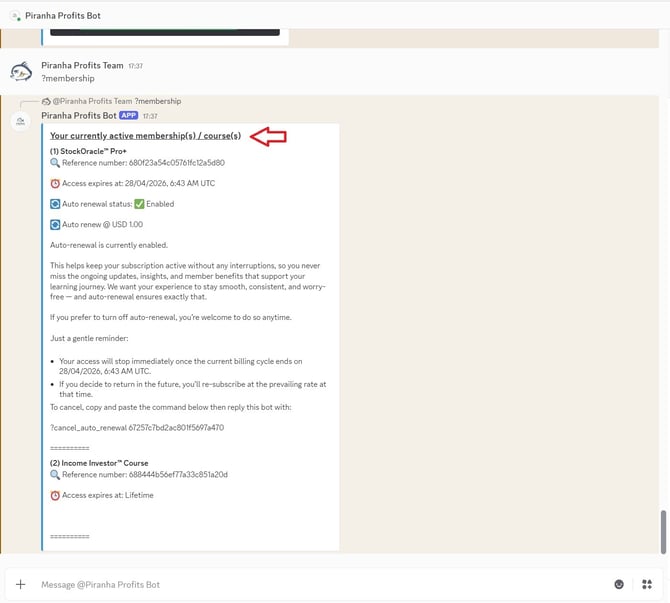
4. The bot will reply with your active subscription(s), including the current
expiration date(s) and auto-renewal status.
(Example StockOracle Pro+ subscription as below)
Need help?
If the bot doesn’t respond, double-check that Direct Messages are enabled (Step 1), then try again. If you’re still stuck, contact support and include a screenshot of what you see.
Contact us at
Email: support@piranhaprofits.com
WhatsApp: Chat with us on WhatsApp