![PP LOGO.svg]](https://help.piranhaprofits.com/hubfs/PP%20LOGO.svg)
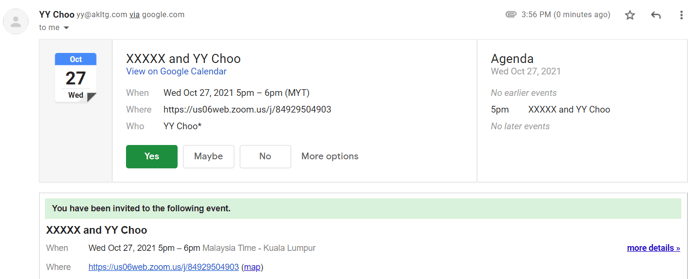
Step 1: Go to your email inbox, search your Personal Coaching Scheduled Invitation email
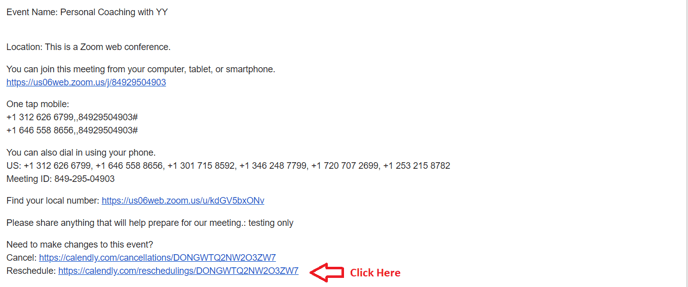
Step 2: Go to “Need to make changes to this event?”, Click on Reschedule link
Step 3: Select a New Date and Time
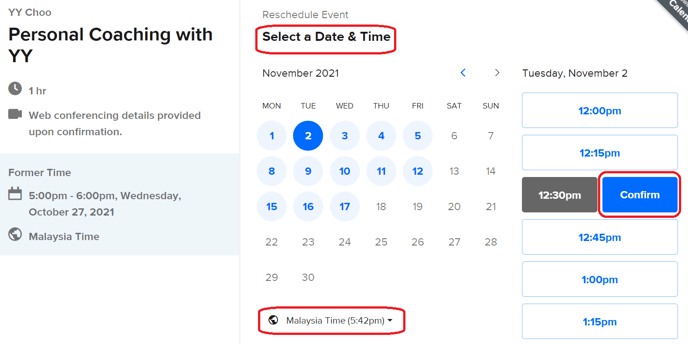
a. Select the Date.
b. Select your time zone.
c. Select the Time.
d. Click on “Confirm”.
Step 4: Enter Reason for Change, then click on “Update Event”
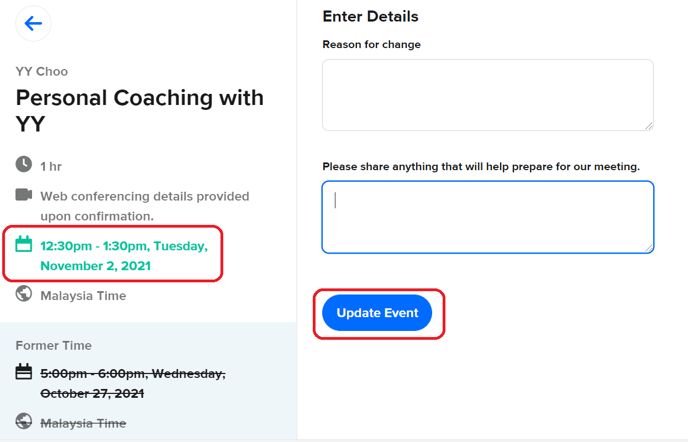
a. Make sure your NEW booking slot (Date & Time) are correct.
b. Enter Reason for change.
c. Click on “Schedule Event”.
*Note:
- Do inform YY on Telegram privately after you have rescheduled your session.
- Kindly reschedule your session at least 3 days in advance.
- You are only allowed to reschedule the sessions up to two times.
If you still encounter any issues, please email the team at support@piranhaprofits.com.